How to start a Telegram Secret Chat? | A Comprehensive Guide All

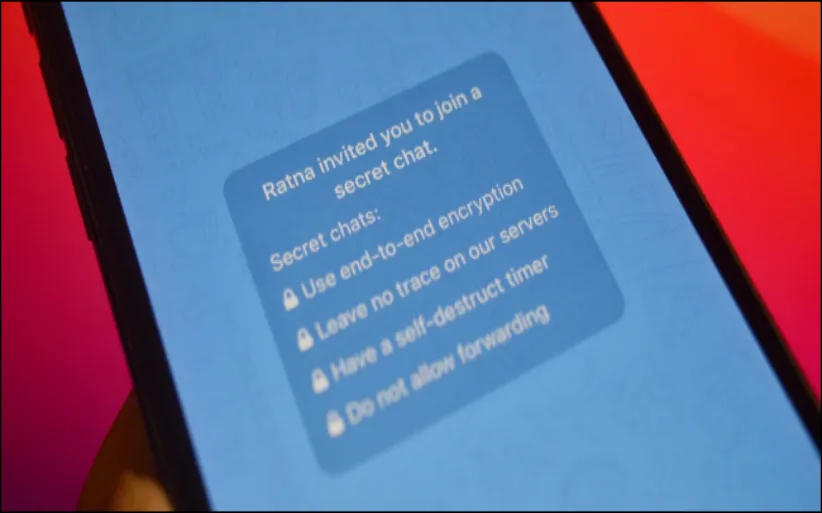
Have you ever wanted to speak with your friends on a safer platform? Telegram provides you with the chance to do so. Telegram Secret Chat is a brilliant feature that allows you to communicate with your contacts at a higher level of privacy and security. This ability has some valuable advantages compared to regular chats. Read this detailed guide from DrTelegram to learn what Telegram’s secret chats are and how you can use them to communicate with your pals!
What is a Telegram Secret Chat?
Secret chat is one of those interesting features of Telegram. Do you know what a private conversation is? A private conversation offers end-to-end encryption and doesn't let anyone take screenshots or use the chat data elsewhere. This is how a Telegram Secret Chat works. Unlike regular Telegram chats, Secret Chats are only accessible by the sender and the recipient. But are there other differences between a regular chat and a secret chat? If you want to figure it out, keep reading!
Telegram Secret Chat vs Normal Chat
You need to know the differences between a Telegram Secret Chat and a regular Chat. Regular chats are stored in the cloud, while secret chats are device-specific. Secret chats use end-to-end encryption, unlike regular chats, which use standard encryption. Secret chats offer self-destructing messages, but regular chats do not. If you know the exact differences, you can make decisions about using them.
What are the benefits of Telegram's secret chat?
1. End-to-End Encryption
Telegram Secret Chats use end-to-end encryption. What does it mean? It means this system ensures that only the sender and receiver can read the messages, so it is safe to use because even Telegram Servers do not decrypt them. In Normal Chats, Telegram messages are encrypted, too. But they can be stored on Telegram’s servers and can be decrypted by Telegram.
2. Self-Destructing Messages
You already knew about self-destructive media that you could send to regular chats. Moreover, Telegram Secret Chats allows you to set a timer for every message to self-destruct. After setting the time, the message will automatically disappear. This feature is not available in Normal Chats.
3. Cloud Storage
Every message and media we send in Telegram is saved in the Telegram cloud. So, the messages in regular chats are much easier to access from multiple devices. On the other hand, Secret Chats, however, are like temporary messages. They are not stored on the cloud and only exist on the devices of the sender and receiver, and will be removed after the chat. You need to know that every message on secret chats won't be saved anywhere, and there is no way to back up files after ending the chat.
4. Forwarding and Saving Messages
Forwarding messages is very easy in regular chats on Telegram. Meanwhile, Telegram Secret Chat messages cannot be forwarded or saved. This feature increases the security of both sides and can be helpful for many Telegram users.
5. Screenshot Alerts
Screenshots are like safe evidence for everyone. Many times, we do not prefer to leave any traces from our messages. Telegram secret chats have solved this problem. Telegram doesn't let users take screenshots from the chat screen. As soon as you shoot the screenshot buttons, you'll be notified that the App doesn't let you take screenshots. This feature creates an extra layer of security against unauthorized acts or misuse of the conversion.
How to start a secret chat in Telegram?
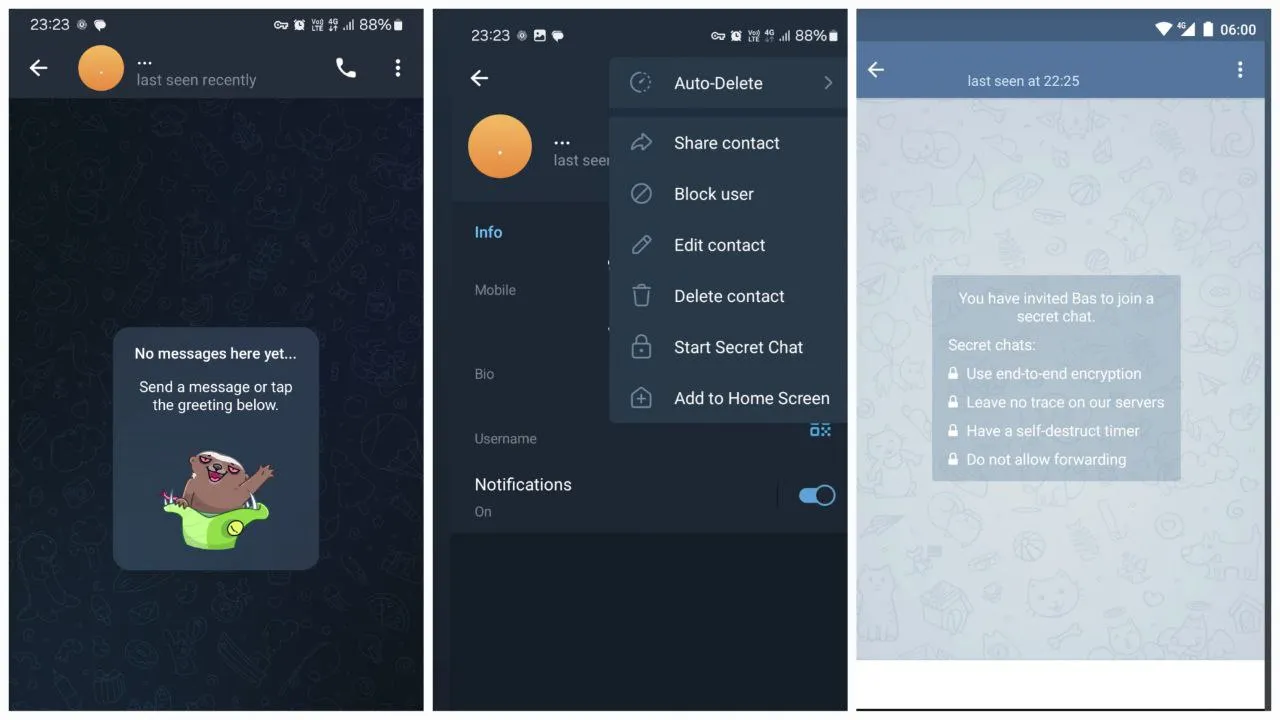
Starting a Secret Chat in Telegram is simple. Follow these steps:
-
Open Telegram
-
Select the contact you want to have a secret chat with
-
Click on their profile
-
Tap on more (...)
-
Start Secret Chat
-
Wait for your contact to join in
-
Begin Messaging
 Telegram Secret Chat Notifications
You will receive notifications when messages arrive in Telegram Secret Chats, just like with regular chats. However, the message's content is not visible in the notifications bar.
Telegram Secret Chat Video Call
Like regular video calls, Telegram secret chat allows you to start video calls with your contacts. The only difference here is the privacy. Again, video calls are encrypted data that do not transfer to the Telegram cloud or anywhere else and are kept safe.
How to Export Telegram Secret Chat?
Telegram authorities do not allow you to export Secret Chats directly due to the privacy policies in Secret Chats. Moreover, Secret Chats are not stored on Telegram’s cloud, so there's no way to get Telegram secret chat backups. If you want to have a record of your secret chat messages, you have to take a photo or video from the chat screen with another phone. This is one of the Telegram applied tricks you must know.
How to Remove Secret Chat in Telegram?
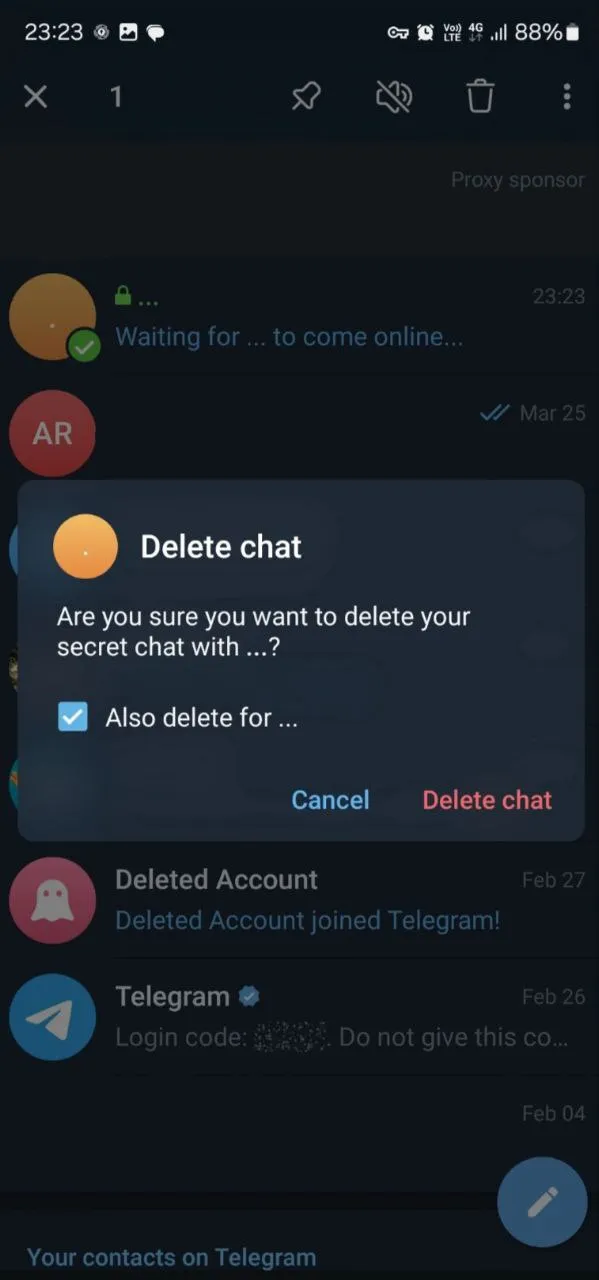
If you want the Telegram secret chat cancelled, you can do so with these steps:
-
Open the Secret Chat
-
Tap on the Contact’s Name at the top
-
Select Delete Chat
-
If you want to delete the chat for both sides, check the “also delete for” box.
-
If you want to delete the chat for yourself, just click on the delete chat button.
 What Happens if You Delete a Secret Chat on Telegram?
When you delete a Secret Chat on Telegram, the chat is permanently erased from both your device and the recipient’s device. Telegram does not notify the other person when you delete the chat, but they will lose access to the chat history as well.
Conclusion
Telegram Secret Chats are a powerful tool for maintaining privacy in your conversations. Offering end-to-end encryption, self-destructing messages, and preventing message forwarding, Secret Chats ensure that your discussions remain confidential. While Secret Chats do have limitations, such as no cloud backup and no exporting features, their focus on privacy makes them an excellent choice for secure communication.
If you’re new to Telegram or want to take your privacy to the next level, starting a Secret Chat is the perfect way to enhance your digital security. Remember to stay vigilant about common issues like disappearing chats or screenshot notifications to ensure your privacy remains intact.
Frequently Asked Questions
Open your contact profile. Click on the (…) in the top right. Tap on start a secret chat.
Yes, they will be notified about it.
Hold your finger on the chat and click on the delete chat button. If you want to delete the chat for both sides, mark the delete also for the box.
Unfortunately, you cannot retrieve or export backups from the secret chat as they won’t be saved in the Telegram cloud.
Thanks for review
Your comment has been submitted and will be displayed after approval.Login
Login | SignUpSimilar Posts

If you want to build a thriving community on Telegram, you need to expand your group's membe...

Losing access to an Instagram account is possible to happen for everyone. The process of recoveri...

Previously, Instagram Reels were used for creating fun content. But in today's online world,...

Instagram’s Add Yours sticker easily helps you to create engaging stories and increase enga...

Frankly, having thousands of followers who never like, comment, or even remember why they followe...

YouTube is a powerful platform that not only plays a crucial role in people's academic and e...

Do you want to increase your connections on Instagram? There are lots of ways to do so. Whether y...

Did you know that you can share other people's stories? Sometimes, you feel like reposting o...

The Instagram algorithm is a frequently used phrase in social media. But what does it resemble? I...

Nowadays, engagement is the talk of social media. Fake followers, bots, or inactive accounts can ...