All the Ways to Repost/Reshare an Instagram Story

Did you know that you can share other people's stories? Sometimes, you feel like reposting or resharing someone else's story on your page. Instagram allows you to do so. But this ability is available in certain situations. What are those situations, and what prevents you from doing it?
In this guide from DrTelegram, we’ll show you all the possible ways to repost/reshare an Instagram story on your IG page. Do not hesitate to read this article!
How to repost a story on Instagram that you're tagged in?
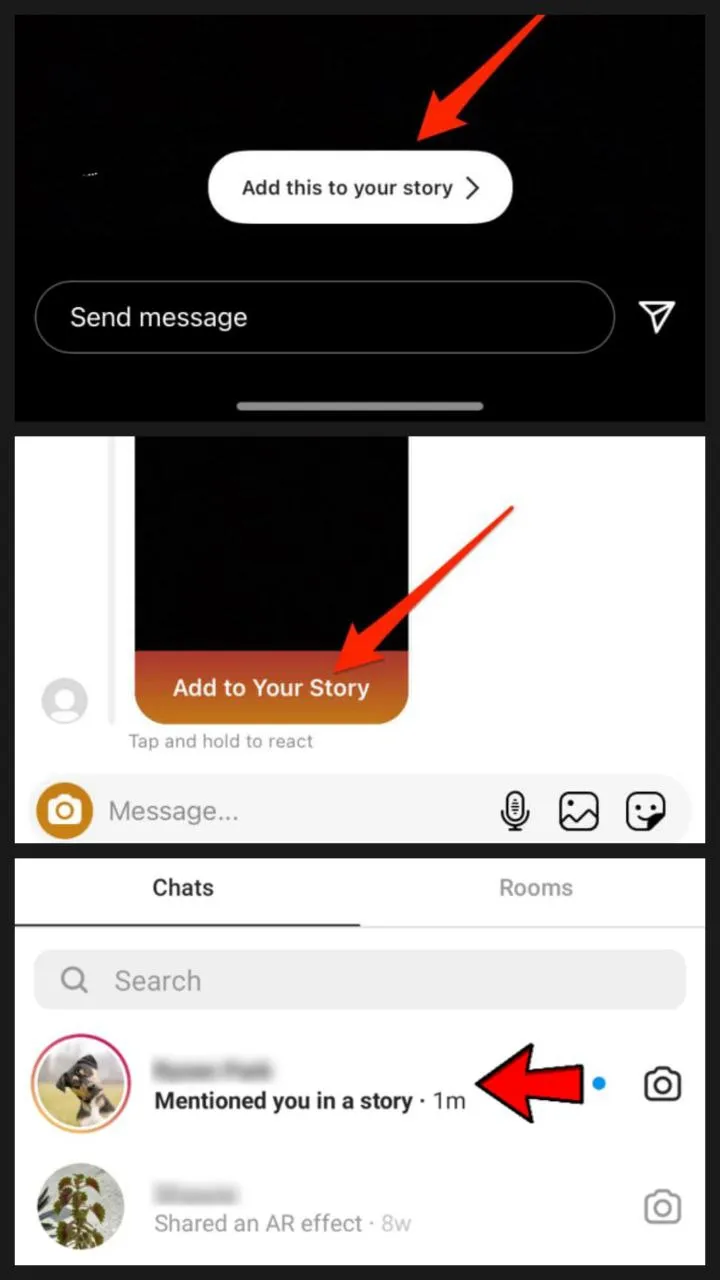
The most likely way to repost/reshare an Instagram story is when you are tagged in that story. This makes resharing easier than ever. Here’s how to reshare Instagram story when you're tagged in one:
-
If you’re tagged in a story, you'll be notified through DMs and the notifications bar.
-
Open the DM or notifications tab and click on the story you're tagged in.
-
Tap the "Add to Your Story" button below the story preview.
-
Customize it as you want.
-
Tap "Your Story" or “Close Friends” to share it with your followers.
 How to repost Instagram story you are not tagged in?
Unfortunately, you cannot repost/reshare an Instagram story directly unless they’ve tagged you. However, some methods can help you out. Here are some:
1. Ask the Person to Tag You
The easiest way is to ask the person to tag you in their story. So you only need to DM them. This enables the "Add to Your Story" option, and you can add their story to your own.
2. Take a Screenshot or Screen Recording
This method may not be moral, but it works 100%. Mostly, it works for private pages. Take a screenshot of the story and reshare it on your page. If you hold your finger on the screen, the HUD will be removed, and you can capture a better shot. For videos, use your phone’s screen recording feature, trim the clip, and upload it to your story.
3. Use a Third-Party App to repost/reshare an Instagram story
Some apps and websites allow you to download and repost Instagram stories. StorySaver and iGram are two of these sites. You can copy the page or story link there, and then you can access the story easily. However, please note that this method is specifically designed for public pages and does not apply to private pages.
Why Can’t I Repost/Reshare an Instagram Story?
Sometimes, you have problems reposting a story on your page. There might be several problems there. Here are some of them:
1. You Weren’t Tagged in the Story
You cannot directly post it on your page if you are not tagged in a story. You need to be authorized by the story owner. So, try contacting them to ask about it.
2. The Owner Disabled Story Sharing
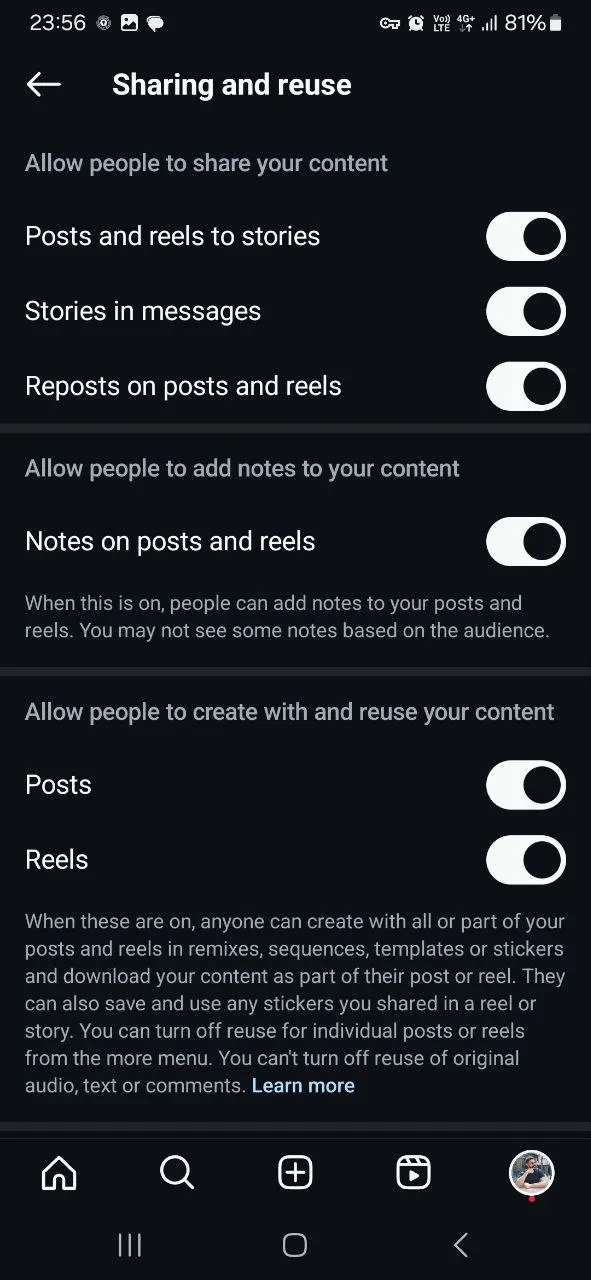
Did you know you can manage how to share reels from your page? In the new Instagram updates, the page owner can limit who can share Reels and stories from their pages. If the Add to story option is unavailable, he may have disallowed you from resharing their stories. You can easily ask the story owner to lift this limit so you can use their content on your page.
 3. Your Instagram App Is Outdated
Instagram applications get updated nearly every month. Every time you postpone the updating process, you may face software bugs and glitches. So keep your Instagram up-to-date. Yet, some bugs don't relate to updates.
4. There’s a Temporary Bug or Glitch
Instagram is run by a massive number of users. So, professional and powerful servers and systems are needed to support user needs. Sometimes, this hardware may go slow or run into serious problems. In this situation, Instagram owners on Meta try to solve this problem, and all you need to do is wait for them to solve the problem.
How to Repost an Instagram Story in Full Screen?
These are two simple rules to repost/reshare an Instagram story. If you want to use Instagram's full-screen repost story feature, follow these rules:
-
Hold two fingers on the screen to zoom in and adjust the size.
-
Use Instagram’s built-in resizing tools on the top bar to make the story fill the screen.
Conclusion
Sharing other people's stories is a great way to communicate with other users and share their content on your page. Whether you are tagged in a story or not, you’ll need to use alternative methods to repost/reshare an Instagram story. In this guide, we tried to teach you different ways of resharing other people's stories on your page.
Now that you know how to reshare Instagram stories, you can communicate with your followers through Instagram story tags and share various content from different pages on your story!
Frequently Asked Questions
If you’ve been tagged, go to your DMs, find the story, and tap "Add to Your Story."
You can take a screenshot or screen record, or ask the original poster to tag you.
You may not be tagged, the original user might have disabled story sharing, or your Instagram app might have run into problems.
Before sharing, double-tap to zoom in and resize the story to fit the screen properly.
Thanks for review
Your comment has been submitted and will be displayed after approval.Login
Login | SignUpSimilar Posts

If you want to build a thriving community on Telegram, you need to expand your group's membe...

Losing access to an Instagram account is possible to happen for everyone. The process of recoveri...

Previously, Instagram Reels were used for creating fun content. But in today's online world,...

Instagram’s Add Yours sticker easily helps you to create engaging stories and increase enga...
Have you ever wanted to speak with your friends on a safer platform? Telegram provides you with t...
Frankly, having thousands of followers who never like, comment, or even remember why they followe...
YouTube is a powerful platform that not only plays a crucial role in people's academic and e...

Do you want to increase your connections on Instagram? There are lots of ways to do so. Whether y...
The Instagram algorithm is a frequently used phrase in social media. But what does it resemble? I...
Nowadays, engagement is the talk of social media. Fake followers, bots, or inactive accounts can ...