How to recover Instagram account? | 2025 Updates


Losing access to an Instagram account is possible to happen for everyone. The process of recovering your Instagram account is frustrating. But there is no need to be worried. In this guide from DrTelegram, we are going to help you recover your Instagram account. Whether you forgot your password or lost access to your email, multiple methods can recover Instagram account in 2025. Then do not waste your time and read this article!
How to recover Instagram account in 2025 updates?
Losing access to an Instagram account may have different reasons. In some situations, you may have deactivated your Instagram account and now you try to get it back. Sometimes you deleted an account or lost authenticating details such as password and Email. Let's check them one by one:
1. Reactivating a deactivated account
If deactivated your account, it means that your data is temporarily inaccessible. But with some simple steps, you can recover your disabled Instagram account easily:
-
Open the Instagram app on your phone
-
Enter your username and password on the login screen.
-
Tap Log In to reactivate your account.
-
Your profile will be recovered.
-
This protocol is similar on Android, iOS, and Windows.
2. Recover deleted instagram account
This is one of the rare situations in which you cannot recover your IG account. When you choose the delete Instagram account button, Instagram will erase all your profile data forever, and there is no way back!
3. Recover the Instagram account without a password and Email
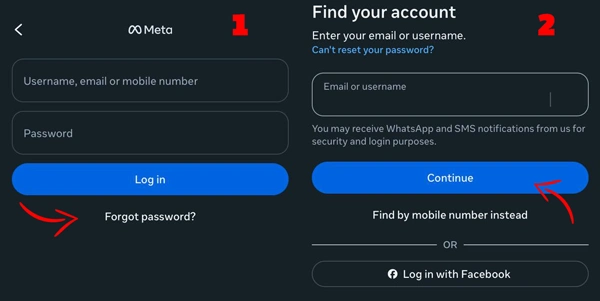
If you’ve lost access to both your email and password, follow these steps:
-
Open your Instagram and go to the login page.
-
Click on Forgot password
-
Enter your username, phone number, or the related email, and tap continue
-
Tap No longer have access to these?
-
Follow the on-screen instructions to verify your identity
4. Recover Instagram account password
This one has a very easy solution. If you remember your email or username but forgot your password, you need to follow these steps:
-
Open the Instagram app or the web version.
-
Try to log in and tap Forgot password?
-
Enter your email, username, or phone number.
-
Instagram sends you a password reset option via a link.
-
Choose a new password and submit it.
What if I can’t recover an Instagram account?!
There might be some occasions when none of the mentioned methods work. In this situation, you can call Contact Instagram Support for help. You can easily submit a support request via the Instagram account Help Center. If your account was disabled, you can use the Appeal Form to request account recovery.
Conclusion
Before you recover Instagram account in 2025, you need to know the correct methods depending on your situation. There are multiple choices for you to get access back to your IG account, from reactivating a deactivated account to resetting your password or contacting the Instagram account help center. Now, if you have had problems recovering your Instagram account, let us know in the comments! Then do not hesitate and use these methods ASAP!
Thanks for review
Your comment has been submitted and will be displayed after approval.Login
Login | SignUpSimilar Posts
If you want to build a thriving community on Telegram, you need to expand your group's membe...

Previously, Instagram Reels were used for creating fun content. But in today's online world,...
Instagram’s Add Yours sticker easily helps you to create engaging stories and increase enga...
Have you ever wanted to speak with your friends on a safer platform? Telegram provides you with t...
Frankly, having thousands of followers who never like, comment, or even remember why they followe...
YouTube is a powerful platform that not only plays a crucial role in people's academic and e...
Do you want to increase your connections on Instagram? There are lots of ways to do so. Whether y...
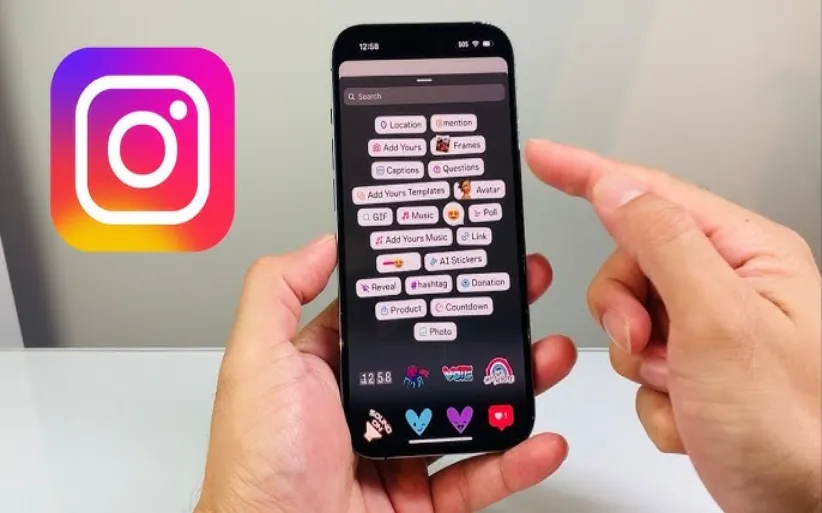
Did you know that you can share other people's stories? Sometimes, you feel like reposting o...
The Instagram algorithm is a frequently used phrase in social media. But what does it resemble? I...
Nowadays, engagement is the talk of social media. Fake followers, bots, or inactive accounts can ...